What is a LICENSE file?
A LICENSE file allows you to add an open source license to your project on openCode.
In order to publish your software on openCode, you must use one of the open source licenses permitted by us in your project.
Adding a LICENSE file
- Open the main page of your project.
- Click on the plus sign and select New File.
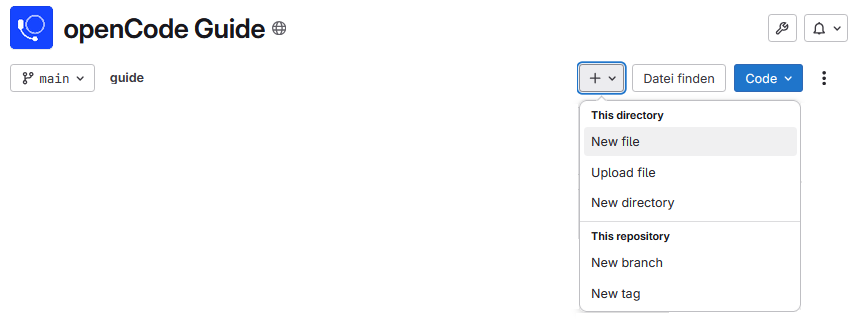
- Name the file
LICENSE. Once you have typed “LICENSE,” the Apply a template button will appear right next to it. There you can directly select a license template that you want to use. If you cannot find the license you want in the templates, you will need to add the license text to the file yourself.
- Complete the process of adding a new license by clicking Commit changes in the top right corner.
Checking a ‘LICENSE’ file
LICENSE files must be checked for completeness and accuracy to avoid legal problems.
For validation, we therefore recommend code scan solutions such as FOSSology, OSS Review Toolkit, and ScanCode, Tern, and sourcing from sources with appropriate quality requirements.
The selected tool generates a report showing which licenses were found, whether they are complete, or whether there is anything wrong with the file.
The final result of the validation must then be recorded in an SBOM file in the form of the checked components and their licenses. This is usually generated automatically by most tools in SPDX format.
Frequently asked questions and problems
Which license is the right one?
If you are unsure which license to choose, you can find support here.
What is an SBOM file?
An SBOM (Software Bill of Materials) contains a list of the components, libraries, and licenses that make up a project. On the one hand, it provides transparency about which external components your project contains, as well as information about the rights and obligations that arise from this. On the other hand, it helps with security and license management.
Scan tools automatically generate a standardized SBOM. This must then be stored in the repository as an SPDX file.
You can find more detailed information on the requirements here.